Binarium app: identify the Android listing first
The practical starting point for mobile Binarium access is the store listing, not an APK advertisement. A Google Play entry for Binarium is published by Binarium LTD under the Android package ID com.binarium.binariummobile. Availability is subject to the app store and the operator’s regional rules. An independently verified App Store listing for the iPhone trading application is still missing from our evidence set.
Check the exact developer name, not just the icon.
Identifies the package shown by Google Play.
We do not recommend a similarly named unverified App Store download.
Already have an account? The login guide is separate. New to the platform? Read the account creation guide before considering a deposit.
The Google Play record and what it actually proves
Use the Binarium listing on Google Play and check the publisher and package ID. The listing was updated on 2 September 2026 when checked for this guide. Google Play also displays installation totals and user ratings, but these fluctuate; neither a download count nor a store rating is proof of an investment outcome or successful withdrawals.
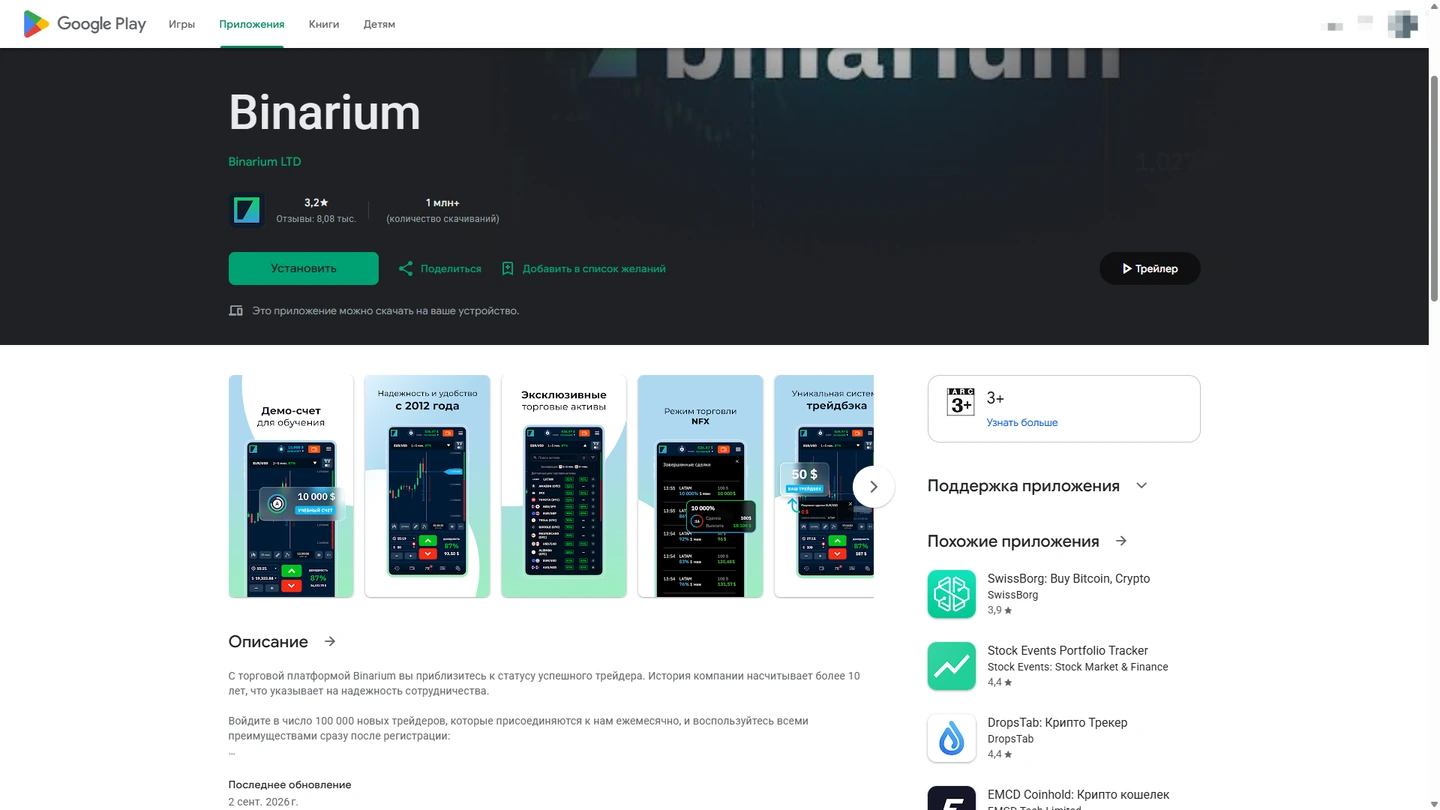
Check the developer name and the exact package identifier com.binarium.binariummobile against the live store listing. The archival screenshot does not confirm iOS availability or country-specific downloads.
Store identity is a combination of fields
A matching search title is not enough to authenticate a trading app. Verify the developer name Binarium LTD, the exact Android package com.binarium.binariummobile and the current store URL together. Treat review counts, update dates and geographic availability as changing store data rather than permanent page facts.
- Open the store listing through its current URL instead of an APK-hosting search result.
- Compare developer and package information before installation.
- If the listing is restricted, do not assume a sideloaded file is an approved substitute.
iPhone access is a different question: we have not verified a corresponding App Store trading-app listing, so an unrelated app with a similar name must not be presented as a download choice.
Google Play states that the developer declares collection of personal and financial information and reports encryption of information during transmission. Review the current permissions and data-safety statements for your own device. Those statements should not be paraphrased as “the application collects no data.”
- Follow the explicit store link
Do not treat a web search result with the same icon as proof of authenticity.
- Compare publisher and package
Look for Binarium LTD and com.binarium.binariummobile.
- Check regional availability
A listing may be inaccessible or incompatible on a particular device or from a particular jurisdiction.
- Install only from a credible source
Never disable device protections to install a file supplied by an unsolicited link.
Choose Android, iPhone or desktop web access
A RuStore listing has also been identified at Binarium on RuStore. During the latest recheck, however, that store returned an access challenge, so its present version and compatibility notes have not been newly verified. A matching Android package name alone is insufficient to independently validate the binary signature of an externally distributed APK.
Android installation and first account access
After installing from the legitimate store, open the app and use the operator’s own login controls. If you already registered on the web, avoid creating a duplicate account merely because you switched devices. If this is the first time you use Binarium, account creation is a separate step from funding it.
Existing account
Use the operator-controlled sign-in process, then confirm the current Demo/Real account label before any trade.
New account
Confirm age and location eligibility. Complete the required account fields and email verification when prompted. A deposit is not the same action as creating a login.
We do not supply an embedded login form or capture credentials. If you encounter a password problem, use the sign-in recovery flow rather than a third-party form.
iPhone: why we do not provide a random App Store link
The operator has referred to iOS support in public help material, but a direct verified App Store product page for this trading app was not established. Other apps with a similar name can serve unrelated purposes. We therefore direct iPhone users to check the operator’s own mobile website from a browser, rather than guessing which App Store result to install.
- Open the operator website in your browser
Inspect the full domain before typing credentials.
- Check whether your region is supported
App availability does not override the operator’s country and residency restrictions.
- Review the mobile layout
Trading screens may place the selected account mode, order amount and expiry in different positions.
- Use web access when no verified app route is provided
Do not follow unofficial download instructions that request disabled security settings.
Can you practice on mobile without depositing?
The Binarium FAQ describes virtual demo funds made available after registration. That is distinct from trading with a funded account. On a phone, confirm the active account mode before touching the direction controls: the smaller touch interface makes an accidental real trade easier.
Demo workflow
The Binarium demo account guide covers virtual balances, account switching and the published reset condition.
Order-ticket workflow
The trading terminal guide covers an asset, entry window, expiry, amount and illustrative payout arithmetic.
A chart on the phone can be visually similar to the desktop chart, but that does not prove that every indicator or control is available in both environments. We have not installed and tested every app build in this stage.
Updating, permissions and app-store differences
Update the app via the store used for installation. Package size, minimum Android version and permissions may differ with region and store build. Do not copy requirements stated on one third-party download site into universal technical specifications.
If an update asks you to log in again, return to the operator’s own authentication channel. If an unfamiliar prompt asks for extra bank details, codes or a downloaded security patch, verify it through the operator before continuing.
Mobile app problem solver
Google Play says the app is unavailable
Inspect the reason shown by the store, device compatibility and regional availability. An unofficial APK is not a safe substitute.
The download starts but does not finish
Check connectivity, free storage, Play Store updates and device health before retrying.
The app opens, then closes
Restart the device and check updates. Do not install unverified modified versions to work around errors.
I cannot remember the password
Use the official recovery flow covered in our login guide. A second account is not the preferred fix.
The app asks me to install another file
Treat it as suspicious until the operator and store source are verified; never switch off device protection just because a prompt says so.
For account-specific problems, contact the operator with an account identifier through its published support channel. Do not share passwords or full card details in public posts.
Mobile access, security and territorial restrictions
Public operator terms identify residents of the United States, European Union, United Kingdom and Canada as among restricted groups, alongside other jurisdictions where offering the product is unlawful. Store availability does not establish that residents of a particular location may trade. This is an independent information website, not the provider of the mobile application.
Check the website address, use device security, and avoid sending verification codes through chat services. Mobile convenience is not a measure of financial safety; leveraged or fixed-outcome trades can lead to the loss of the amount committed to them.
Binarium mobile app FAQ
Which Binarium Android app is verified?
The Google Play listing under Binarium LTD with package com.binarium.binariummobile.
Is there an official iPhone trading app?
We cannot provide a verified direct App Store link from our evidence. Use the mobile website rather than a similar-looking app.
Can I download a Binarium APK here?
No. This website does not host APK files or recommend bypassing Android protections.
Is the RuStore version the same?
The known listing uses the same package name, but a current signature or build equivalence check was not performed.
Does installing the app require a deposit?
Installation and account creation are separate from funding a real trading account.
Is there a Windows application?
No separately verified Windows/macOS installer was established for this article. Use the browser platform.
What if the store blocks installation?
Check the store error and operator eligibility rather than trying unofficial mirrors or installation packages.
Where to go after choosing your device
Use this page as an installation and authenticity reference. The following guides serve different tasks and are not duplicate copies of a download article.