Binarium deposits: start with your own cashier
Funding a Binarium account is an account-specific payment action. Open the operator’s cashier, select a method that is currently offered for your account and confirm the currency, minimum, upper limit and any payment-provider requirements. A payment method seen in someone else’s account is not a universal promise of availability.
Official FAQ says most methods, with exceptions by provider.
A dated 12 September 2026 observation, not a country-wide availability claim.
Network and amount must be reconfirmed inside the live cashier.
If you have not signed in, visit Binarium Login. If you have not registered, follow the separate registration guide. This article does not duplicate either workflow.
Why minimum funding amounts are not universal
The public English Binarium FAQ describes a minimum of $5 or its equivalent for most payment methods. It also explicitly directs users to the Cash Register for the minimum attached to each method. The qualifier is essential: a particular wallet, bank route or crypto processor may impose a different threshold, and the final amount may be displayed in another account currency.
A quoted minimum does not cover card-issuer conversion charges, third-party processing fees or the effect of sending crypto below a required threshold. Do not rely on an old blog table if the cashier displays a different value today.
Account currency
The user’s account may be denominated in EUR or another currency; conversion and method limits must be read in that denomination.
Payment rail
A wallet transfer, card route and crypto transaction are not interchangeable. Availability and processing conditions can change.
A clear deposit checklist from sign-in to confirmation
- Open the operator-controlled account
Sign in using Binarium rather than entering credentials on a third-party landing page.
- Open the cashier and choose Deposit
Confirm the heading and currently displayed account currency.
- Select a payment option
Do not assume all methods shown on the internet will appear for your account.
- Read the live limit and fee information
Check both the amount entered and what will be transferred after potential provider charges.
- Review the bonus choice and payment owner
Understand the terms and use a payment method that belongs to you.
- Submit only after checking the destination
For crypto, double-check the asset, network and fresh deposit address; retain the transaction reference.
The instructions above describe a decision sequence; they do not imply that we executed a new real-money deposit in October 2026.
A dated EUR-account cashier observation
Earlier first-hand site material records a cashier check on 12 September 2026. That particular EUR-denominated account showed WebMoney and Tether. The Tether screen showed TRON (TRC-20) with a displayed range of 9–86,220 EUR, and a no-bonus selection was available.
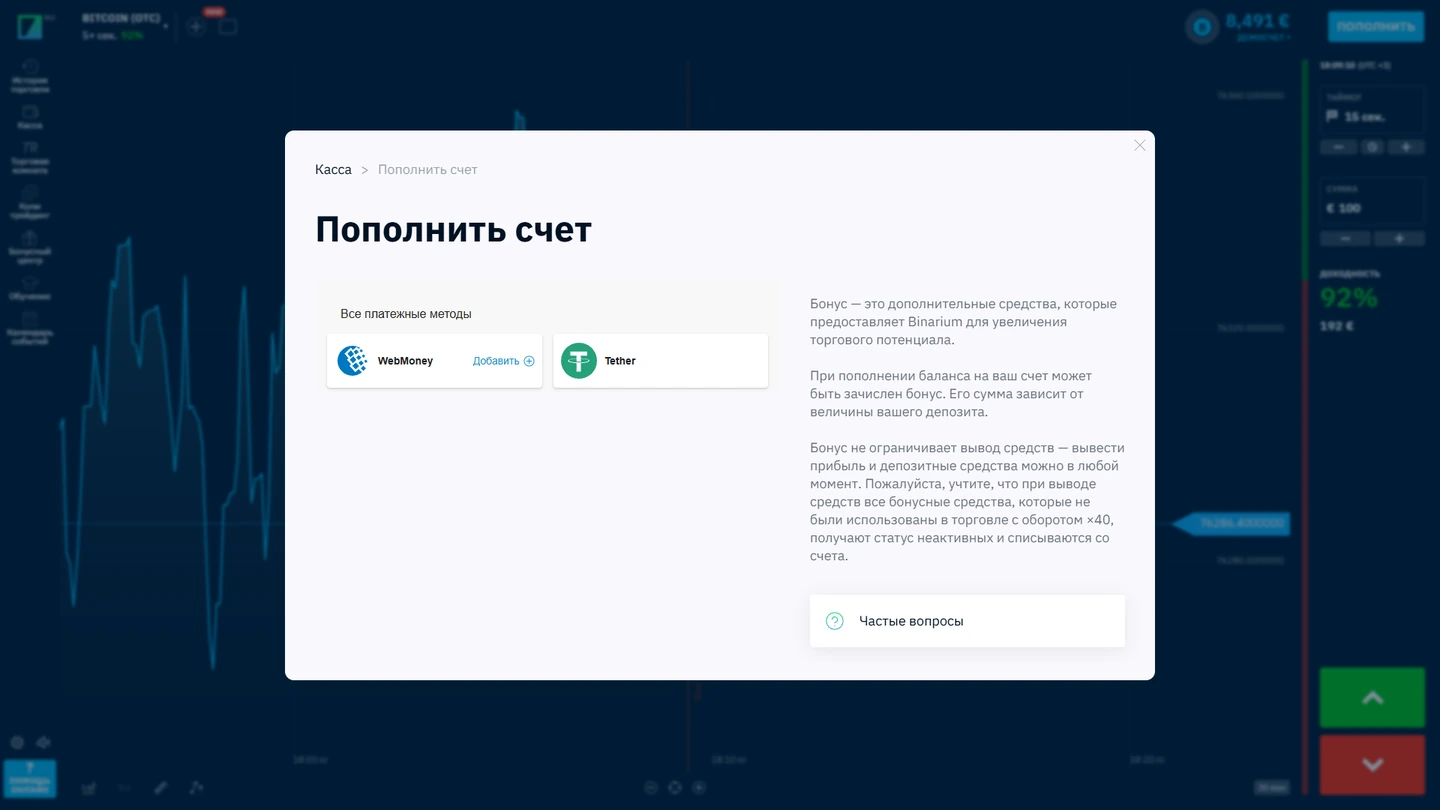
In the account examined on 12 September 2026, the cashier displayed WebMoney and Tether. This does not establish payment-method availability in another currency, country or user account.
One observed range does not replace the official FAQ’s general minimum, and it should not be used to claim that a 9 EUR crypto transfer is supported from every country or on every trading account.
Tether deposits: confirm the network, not just the coin name
USDT may be supported on different blockchain networks. A payment request tied to TRC-20 must not be treated as compatible with an ERC-20 address or a differently labelled chain. Mistakes can be irreversible, so the network, asset and current address matter more than the speed of making the transfer.
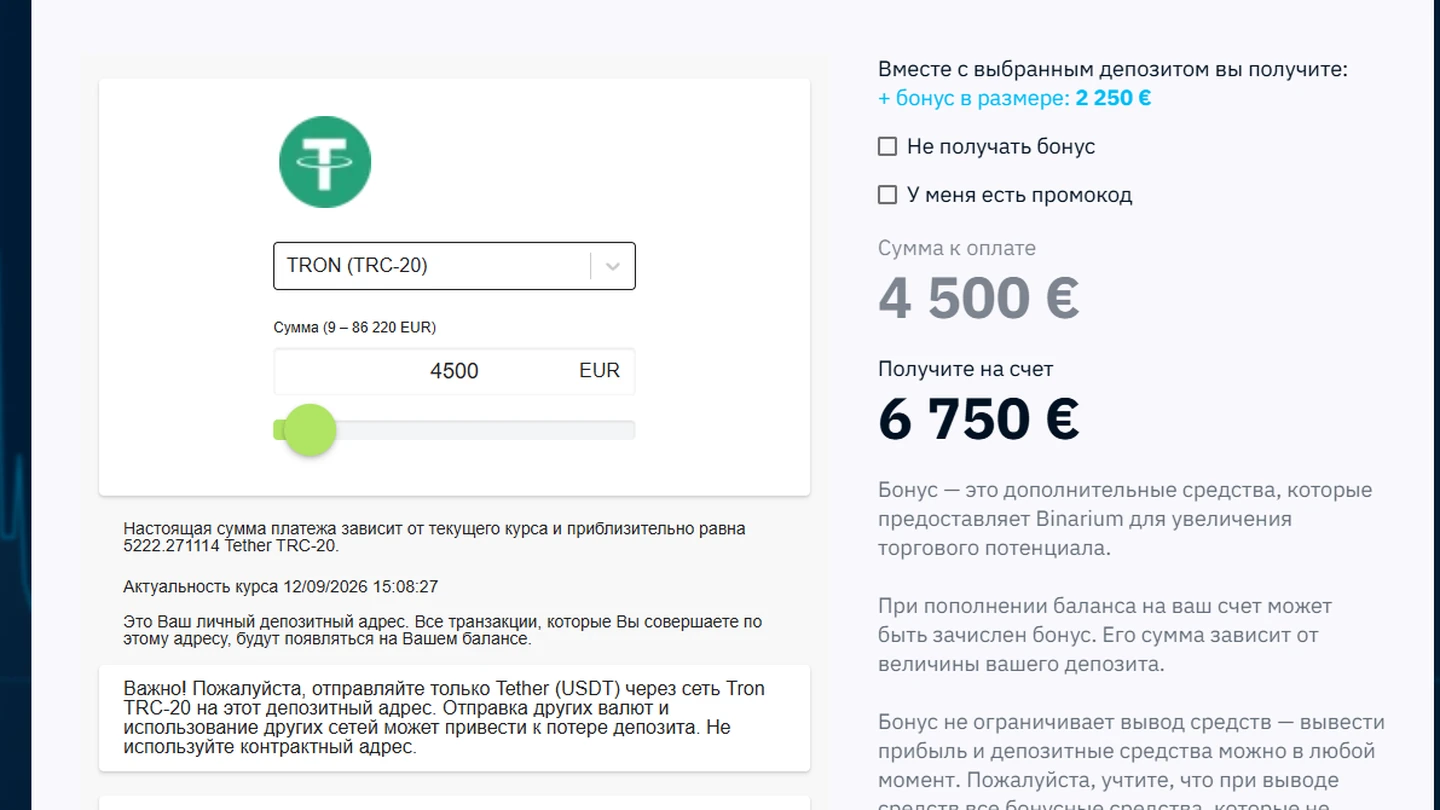
The selected chain is a critical payment field. This screenshot is not a successful transaction record; confirm the live address, coin, chain, minimum and network fees before transferring anything.
- Choose the crypto route inside the cashier
Confirm that Tether is actually displayed as a currently enabled method.
- Match the blockchain network
Compare the sending wallet and the cashier; do not infer compatibility from the asset ticker alone.
- Review the payment range and sending fees
The amount that arrives may differ from the amount debited by a wallet.
- Copy the address from the current cashier
Do not reuse a past screenshot or an address from chat.
- Record the transaction hash
It helps distinguish a pending transfer from a wrongly addressed one if support is needed.
Bonus selection before funding
The checked account offered an option to proceed without a bonus. If a bonus is presented to you, review its turnover rules, possible withdrawal implications and cancellation conditions before payment. A large promotional percentage is not the same as money immediately available to withdraw.
Funding without a bonus
This may simplify the decision, but it does not remove general account checks, trading risk or payment-provider rules.
Accepting a bonus
Check all conditions linked to the offer before selecting it. Do not assume a bonus credited to an account is equivalent to freely withdrawable cash.
If your real goal is accessing existing funds, see the separate withdrawal guide rather than placing another deposit.
Preflight checker: five conditions before you pay
This small checklist is a local decision aid. It does not process money, ask for sensitive payment information or communicate with Binarium. Use it to catch mismatched networks, minimums and bonus selections while the real cashier remains open in another tab.
Completing the checklist is not a prediction that a particular payment will succeed. The actual authorization, settlement and compliance checks are handled by the operator and its payment provider.
A missing deposit: identify the transaction state
If a transfer has left the sending account but is not reflected in Binarium, do not immediately repeat it. First establish whether the payment provider marked it as complete, whether crypto confirmations are still pending and whether the cashier has requested a compliance check.
Three payment states worth keeping separate
Money leaving a wallet or card is not automatically a posted balance in the Binarium cashier. Keep the process in order: sender authorized or broadcast the payment → payment network/provider processed it → operator account was credited. A delay between those stages needs investigation, not an immediate repeat transfer.
- Card or e-wallet: preserve the provider reference, local time, amount and currency without exposing full card numbers.
- USDT: preserve the transaction hash, token and chain. Never send to an old address copied from a screenshot.
- Cashier balance: compare transaction history with the expected account currency before escalating to support.
Our historical EUR-account observation did not include a successful deposit test. It shows available methods at that time, not guaranteed current availability or settlement speed.
Card or wallet was charged, but account balance is unchanged
Record the payment receipt, timestamp, amount and provider transaction ID. Check account history before contacting official support.
USDT transfer is visible on a blockchain but not in the account
Confirm chain, token contract, address and confirmation status; keep the hash for the operator.
Amount is under the method minimum
Read the currently displayed threshold for that exact route. Another provider’s minimum does not override it.
My familiar method disappeared
The list is account- and market-dependent. Check the current cashier rather than sending funds to a previously saved destination.
A verification or source-of-funds question appears
Respond only through legitimate operator channels with information related to your own payment method.
Provide support with the reference information needed to locate the payment, not your password, one-time access code or full card number.
Payment ownership, KYC and refunds are separate issues
The operator’s Client Agreement prohibits using third-party cards and identity documents. It describes circumstances where identity, address, card ownership or source-of-funds evidence may be requested. Use your own payment account and understand these conditions before you pay.
The same agreement discusses a refund request where an account was funded but no trades were placed. This is not a guarantee that all deposits can be reversed free of charge; refund method fees and other conditions may apply. Refunds, funded-account withdrawals and trading losses should not be conflated.
Binarium deposit FAQ
What is the Binarium minimum deposit?
The official FAQ gives $5 or equivalent for most methods, but the exact figure depends on the chosen payment provider and account currency.
Which payment methods are always available?
No universally fixed list has been verified. Your live cashier is the authority for methods currently enabled on your account.
Can Binarium accept USDT TRC-20?
A September 2026 EUR-account check displayed a Tether TRC-20 route; current availability and network must be confirmed in your own account.
Can I decline a deposit bonus?
A no-bonus choice appeared in the checked account; check the current offer and cashier conditions.
Why has my transfer not been credited?
Possible causes include provider processing, crypto confirmations, a limit mismatch or additional verification.
May I fund with another person’s payment card?
The operator’s terms prohibit third-party identity and payment instruments.
Is a deposit the same as requesting a withdrawal?
No. They have different rules, controls and processing stages. Use the separate withdrawal instructions.
Choose the right next step
Funding is not a prerequisite for learning how the virtual mode works. If you have an account, you can first examine the demo process and learn where the trading fields are shown. For an already completed payment, retain transaction details; for a payout, read the separate withdrawal instructions.