Binarium sign-up: a clear route from form to confirmed email
The useful part of a registration guide is knowing what to check before submitting a form. Binarium’s published sign-up flow asks for an email address, password, account currency and acceptance of the agreement. It also shows a partner promo-code field. Account creation is distinct from depositing funds or entering a real-money trade.
Use an inbox you control.
Check the offered choice before submission.
Follow the operator’s email link.
This is an independent guide, not the operator’s registration form. We never collect account passwords, promo codes or identification documents. The platform link is an affiliate link.
Check age, location and existing-account rules
Binarium’s FAQ states an 18+ minimum age and permits only one active account per user. It also references country restrictions in the customer agreement. The operator’s website says its services are not directed to residents of the United States, European Union, United Kingdom or Canada, and restrictions can apply elsewhere.
Before registering, check your applicable law and the operator’s current terms. A public page being accessible in your browser is not evidence that your country is accepted. If you already have a profile, the correct next step is Login and account recovery rather than a second sign-up.
Can I open the webpage? is technical. May I use the service? depends on legal and operator eligibility. Do not confuse the two.
What each registration field is for
Your account address
Choose an email address that you can open again for confirmation and later account recovery. Check every character, including punctuation and the domain.
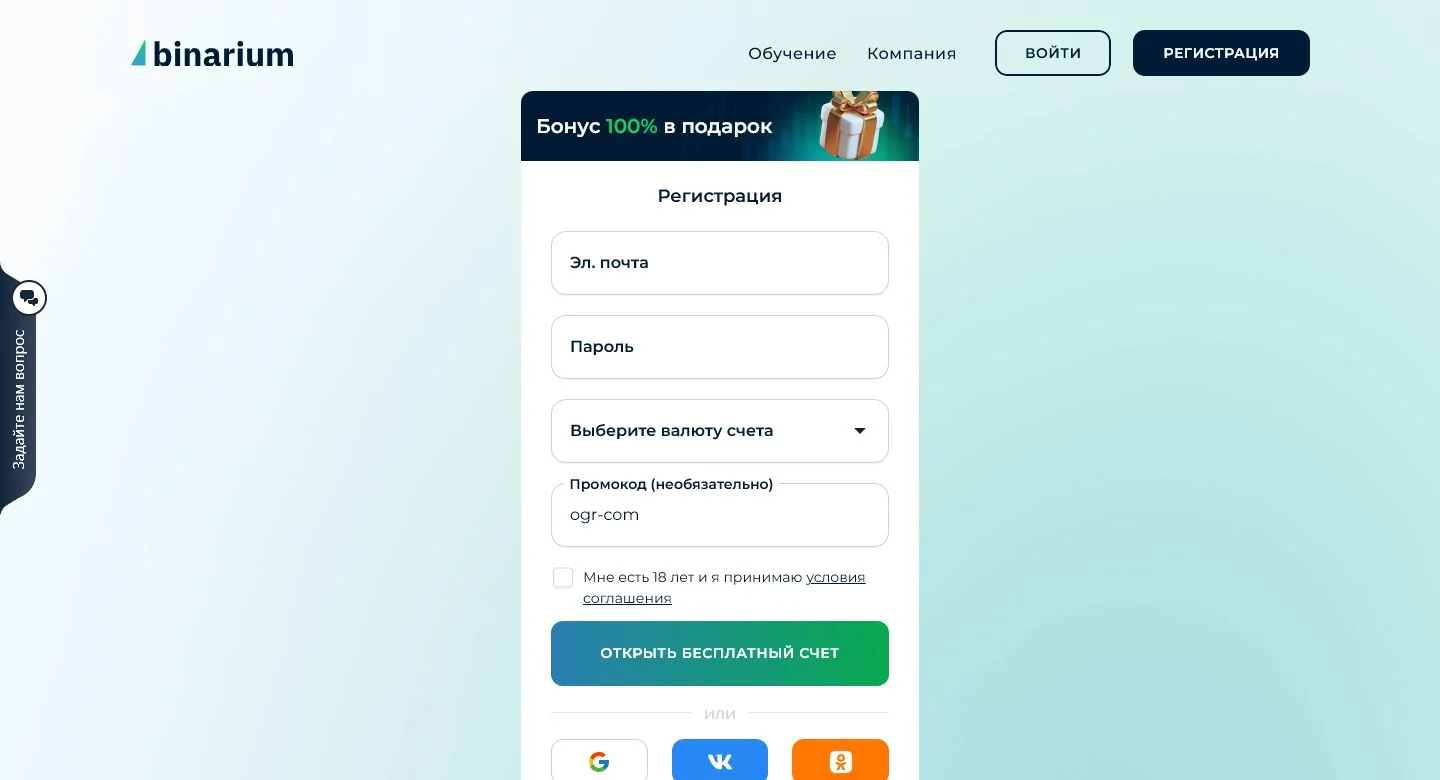
The original Russian-language capture demonstrates the sign-up fields, not a verification-approved account. Promo wording and third-party sign-up choices must be checked in the live form rather than inferred from this archived image.
Your sign-in secret
Create a unique password and keep it private. Requirements displayed by the live operator form take precedence over generic guides; do not rely on a guessed minimum character count.
Denomination of the account
The registration form includes a currency choice. Review what the form actually offers in your market. We cannot confirm that a choice is permanently locked or freely adjustable afterwards.
Partner promo code
There is a distinct field for a promotional code. Whether a code works, and what conditions attach to it, depends on an actual offer; we do not promise an automatic welcome bonus.
Age and acceptance
The operator requires confirmation of adulthood and agreement to its conditions. Read the relevant terms before accepting them.
How to complete Binarium registration
- Open Binarium’s registration interface.
After following the platform link, locate the operator’s own sign-up form. We cannot guarantee that an affiliate redirect will display the exact form immediately.
- Add your account details.
Enter the email address you intend to keep, create a password and inspect the account currency selection. Do not copy example credentials from another webpage.
- Handle optional and mandatory choices separately.
Only apply a promo code if you have a valid offer and understand its rules. Review the age and agreement checkbox before submitting the form.
- Submit, then confirm the email.
The published FAQ asks users to check their inbox and click the confirmation link sent by Binarium. Do not assume a completed form automatically means a confirmed mailbox.
Email verification: an important separate step
The operator’s instructions explicitly include an email confirmation link. This matters because the address on the account may later be needed for password recovery, account alerts and correspondence. An unverified or mistyped address can complicate those tasks.
The completion point is not the Sign Up button
There are at least three checkpoints in a typical account-creation journey: the form accepts the supplied fields, the account email is confirmed, and any later identity or payment checks are addressed separately. A completed form is not proof of the other two.
- Form rejection: correct the specific field or mandatory consent; do not assume that a new browser or promotional code fixes invalid information.
- Verification pending: check the mailbox tied to the registration and follow the operator’s own instructions. Starting another profile may complicate account identification.
- Email confirmed: use virtual practice if appropriate; verification of an email is not a request to deposit.
The selected account currency and optional partner-promo field deserve attention before submission. Do not infer that either can always be changed retroactively.
If the message is in your inbox
Check the sender and destination before opening the link. Complete the instructions in the operator’s email, then use the existing-account sign-in guide for future sessions.
If you never received it
Review the address you entered, junk-mail filters and other inbox tabs. Do not assume a particular arrival time or reset-link lifetime. Seek the operator’s help if the issue continues.
Why might Binarium registration fail?
Select the message closest to what you see. This on-page guide uses only published instructions and general troubleshooting; it does not look inside your Binarium account.
The email seems to be registered already
Before opening another profile, attempt sign-in or password recovery on the existing one. Binarium’s one-active-account rule is a reason to resolve the old profile first.
The password or another input is rejected
Follow the live form’s validation messages, check the email format and make sure required acknowledgments have been completed. Do not trust unsupported password rules quoted on third-party pages.
A partner promo code does not work
Confirm that the promotion exists, is valid for your account and has not expired. A failed code is not a reason to send your account credentials to someone offering a secret replacement.
The confirmation email is missing
Check spam and inbox filters, then contact the operator if needed. Never forward a confirmation token to unknown helpers.
The form or submit button is inaccessible
Check the legitimate operator domain, browser and internet connection. Some countries or accounts may not be eligible; avoid untrusted mirrors and copied registration forms.
Try the Demo account before using real funds
The official Binarium FAQ describes registration as free and says users can practice on a demo account before depositing. For a USD-denominated account, its English FAQ cites an initial virtual amount of $10,000. That is a demonstration balance, not transferable money and not necessarily the same numerical amount in other currencies.
Our Binarium Demo Account guide covers switching between practice and real mode and the conditions for restoring virtual funds. For the actual controls, assets and expiry timeline, use the Trading Platform guide. These tasks have dedicated pages so the registration article stays focused.
Can you register from a phone?
The operator describes browser access from connected devices. Registering in a mobile browser does not require installing a particular app; if you choose an app later, use the Mobile App page to check publisher information and store availability. The register/login experience can vary by language, device and country, so rely on your live form for the exact options.
We do not publish a copy of Binarium’s registration form on this site. This protects users from mistaking an affiliate content page for the account provider.
Binarium registration FAQ
Is opening a Binarium account free?
The operator’s published FAQ states that registration is free. Depositing real funds is a separate decision.
Do I need to deposit immediately after sign-up?
No. Binarium describes a demo mode users can explore before depositing real funds.
What documents are required at sign-up?
The FAQ describes initial registration without documents, subject to accepting the agreement. Additional checks can apply later to account operations.
Do I have to use a promo code?
The form offers a promo-code field, but the existence of that input does not prove any particular bonus or make a specific promotion obligatory.
Can I have two accounts on different emails?
Binarium says one active account per person. Recover an existing account rather than creating a duplicate.
What if I chose the wrong account currency?
Contact Binarium before assuming it can or cannot be changed. The current post-registration currency-change rules are not independently verified.
Can people under 18 register?
No. The operator’s FAQ requires users to be at least 18, with further location restrictions.
Open one account and verify it carefully
Check that you are eligible, use an email address you control, read the terms and confirm the verification message. You can then decide whether to explore Demo or other features.
Independent publisher; the platform link is sponsored. Trading products can result in substantial losses. Geographic restrictions apply.